
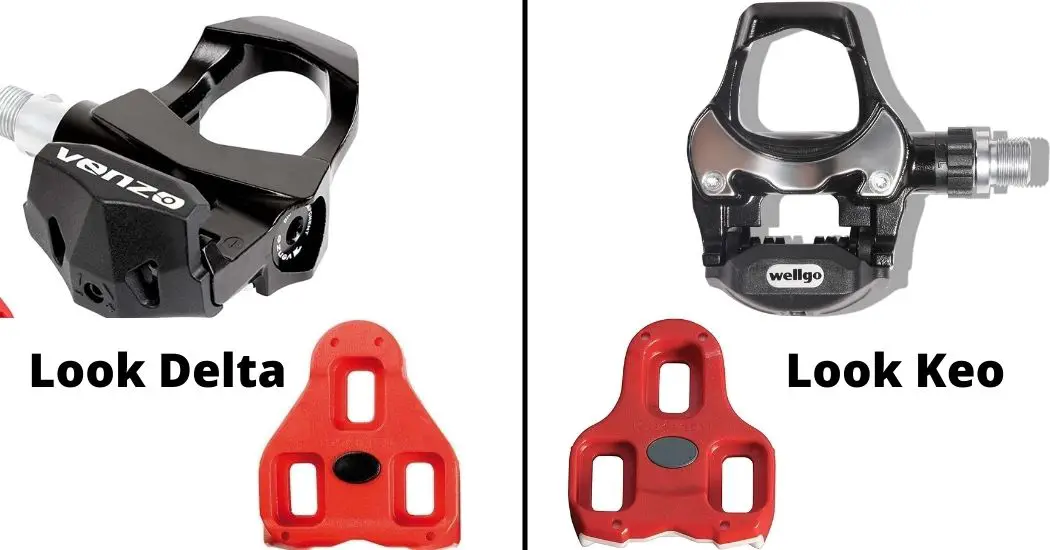
The main difference between Look Delta and Look Keo is compatibility—Look Delta cleats only work with Delta pedals (commonly found on Peloton bikes), while Look Keo cleats only work with Keo pedals (popular on modern road bikes). If you buy the wrong cleats, you simply won’t be able to clip in.
This guide explains Look Delta vs Look Keo in plain English: compatibility, Peloton use, float (0°/4.5°/9°), comfort, and how to choose the right setup.
What Are Look Delta and Look Keo?
Both systems are made by LOOK Cycle, but Delta and Keo are two separate cleat-and-pedal standards.
Look Delta (Common on indoor bikes)
- Older LOOK standard and still widely used on indoor/spin bikes
- Larger, triangular cleat shape
- Wide contact area and a “memory positioner” feature on official Delta cleats
Official reference: LOOK Delta cleat (official product info)
Look Keo (Common on modern road bikes)
- Newer, more common road standard
- Smaller, lighter cleat design
- Available in multiple float options (commonly 0°, 4.5°, 9°)
Official reference: LOOK Keo cleat (official product info)
Look Delta vs Look Keo Compatibility (Most Important)
They are NOT interchangeable
- Delta cleats do not fit Keo pedals.
- Keo cleats do not fit Delta pedals.
Why people get confused: the 3-bolt shoe pattern
Most road cycling shoes use a 3-hole/3-bolt mount. That means many shoes can mount either Delta or Keo cleats—but you must match the cleat to your pedal system.
Look Delta vs Look Keo for Peloton Riders
If you ride Peloton, this is the key point:
- Peloton’s Bike uses Delta-compatible cleats and supports shoes with a 3-screw hole setup.
Source: Peloton Bike Shoes (official support)
If you already have Look Keo cleats
You have two practical options:
- Option A (easiest): Keep your Peloton pedals and switch to Look Delta cleats.
- Option B: Swap your Peloton pedals to a Keo-compatible pedal system, then keep using Keo cleats.
Float Explained (0° vs 4.5° vs 9°) and Why It Matters
Float is how much your foot can rotate while clipped in. Many riders prefer some float because it can feel more natural on the knees and hips (especially indoors where you repeat the same motion).
Common LOOK float options (color-coded)
- Black: 0° float (fixed)
- Grey: 4.5° float (moderate)
- Red: 9° float (maximum)
Official Keo Grip listing confirms the 0°/4.5°/9° float options: LOOK Keo Grip cleats (official product info)
Which float should you choose?
- Most people do well with 4.5° (balanced feel + some freedom).
- Choose 9° if you want more rotational freedom or you feel “locked in” easily.
- Choose 0° only if you specifically want fixed positioning and you’re confident your cleat alignment is dialed in.
Comfort, Stability, and Real-World Feel
Look Delta feel
- Often feels very stable for steady indoor cadence
- Common choice for Peloton riders because it’s the stock standard
- Delta cleats are designed for safe twist-out disengagement and wide contact area (per LOOK)
Reference: LOOK Delta cleat details
Look Keo feel
- More “modern road” ecosystem (more pedal/cleat options in general)
- Keo Grip versions add traction features intended to improve off-bike stability when walking (per LOOK)
Reference: LOOK Keo Grip details
Look Delta vs Look Keo: Side-by-Side Comparison
| Feature | Look Delta | Look Keo |
|---|---|---|
| Main use | Indoor / spin bikes (very common) | Road bikes (very common) |
| Peloton stock compatibility | Yes (Delta-compatible cleats) | No (unless you swap pedals) |
| Interchangeable with the other? | No | No |
| Typical float options | 0° / 4.5° / 9° (varies by model) | 0° / 4.5° / 9° (confirmed on Keo Grip) |
| Off-bike traction | Usually slippery (hard plastic) | Grip versions available (per LOOK) |
Which One Should You Choose?
Choose Look Delta if:
- You ride a Peloton with the original pedals
- You want the simplest “buy cleats and ride” setup
- You don’t want to change pedals
Choose Look Keo if:
- Your bike already uses Keo pedals (typical road setup)
- You want to standardize across road + indoor bikes by swapping pedals
- You want Keo-specific cleat options like Keo Grip (traction features)
FAQs
Is Look Delta the same as Look Keo?
No. They are different standards and not cross-compatible.
Can I use Look Keo cleats on Peloton?
Not with Peloton’s stock pedals. Peloton states its Bike uses Delta-compatible cleats. Source: Peloton Bike Shoes (official)
Do Peloton shoes work with Delta and Keo?
Peloton notes Delta cleats can be attached to Peloton shoes or any shoes with a 3-screw hole setup. Many 3-bolt shoes can mount either cleat type, but the cleat must match your pedals. Source: Peloton’s cleat guidance
What float should I pick for indoor riding?
Many riders start with 4.5° for a balanced feel. If you feel too “locked,” try 9°. If you want fixed positioning, choose 0°—but only if you’re confident in your cleat alignment.
Are Keo Grip cleats less slippery to walk on?
LOOK notes Keo Grip cleats include features intended to improve stability/traction off the bike. Reference: Keo Grip official product page
Why does Peloton use Look Delta?
Peloton’s official guidance is built around Delta-compatible cleats, which keeps setup simple for indoor riders and matches the stock pedal system. Source: Peloton Bike Shoes (official)
Conclusion
Look Delta vs Look Keo isn’t about which is “better”—it’s about what your pedals are designed to accept. If you ride Peloton with stock pedals, Look Delta is the correct choice. If you ride a road bike with Keo pedals (or you want to standardize by swapping pedals), Look Keo is the right ecosystem.