
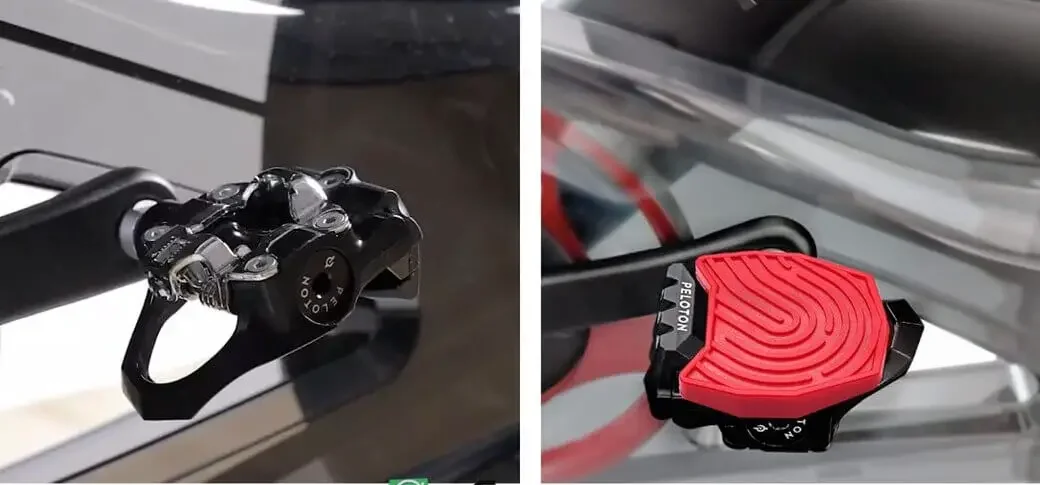
Yes—you can convert Peloton’s default (Delta-compatible) pedals to SPD (2-bolt) or flat/platform pedals by swapping the pedals, because Peloton uses the standard 9/16″ x 20 TPI bicycle pedal thread used on most modern cranks. (For the standard and threading details, see Park Tool.)
This matters because the “best” pedal setup depends on what shoes you want to ride in (cycling shoes vs sneakers), whether you share your Peloton with family members, and how much stability you want during climbs and high-cadence intervals.
What Pedals Come With Peloton by Default?
Peloton’s stock pedals are Delta-compatible clip-in pedals (Look Delta style). If you like the locked-in feel and use 3-hole road cycling shoes, you can keep these pedals as-is. Peloton sells the official replacement pedal set on Peloton.
Can You Convert Peloton Default Pedals to SPD or Flat Pedals?
Yes. Because the Peloton crank uses the common 9/16″ x 20 TPI threading, you can install most standard adult-bike pedals, including:
- SPD (2-bolt) clip-in pedals
- Flat/platform pedals
- Dual-sided pedals (SPD on one side, flat on the other)
Your Best Conversion Options (Choose Based on Your Shoes)
Option A: Keep the Stock Delta Pedals (No Conversion)
- Best for: Riders who already have 3-hole road shoes (Delta-compatible).
- Why: Maximum stability and power transfer for performance-style riding.
- Official reference: Replacement Delta-compatible pedals on Peloton.
Option B: Use Sneakers Without Swapping Pedals (Toe Cages/Toe Clips)
- Best for: Occasional sneaker rides, guests, or quick setup.
- Why: No full pedal swap required; easier entry than clip-ins.
- Official reference: Toe clip accessory on Peloton (price and availability may change by region).
Option C: Swap to SPD (2-Bolt) Pedals
- Best for: Riders who want clip-in security with shoes that are easier to walk in.
- Why: SPD is widely used, beginner-friendly, and often easier to clip out.
- Example (official listing): SPD pedals such as PD-M520 appear in the pedal lineup on Shimano (pricing varies over time).
Option D: Swap to Flat/Platform Pedals
- Best for: Beginners, rehab/recovery rides, and anyone who wants to ride in any shoes.
- Why: Maximum convenience—no cycling shoes required.
- Tip: Look for grippy platforms and solid bearings; confirm the pedal is 9/16″ threaded.
Option E (Most Flexible): Dual-Sided SPD + Flat Pedals
- Best for: Households with mixed riders (some clip in, some ride in sneakers).
- Why: One pedal set supports both styles without changing hardware.
- Example (official listing): Dual-platform SPD pedals like PD-EH500 are listed on Shimano.
Tools You’ll Need (And the One “Gotcha” That Saves Your Cranks)
Most pedal swaps take 10–20 minutes with basic tools:
- 15mm pedal wrench (many pedals)
- Hex key (some pedals install from the back of the crank)
- Grease (recommended to help prevent seizing and make future removal easier)
Important: The left pedal is reverse-threaded. This is standard on bicycles and prevents pedals from loosening during riding. For a clear explanation and direction guidance, see Park Tool and Sheldon Brown.
How to Convert Peloton Pedals (Step-by-Step)
Step 1: Stabilize the Bike
Park the bike on a stable surface. If your Peloton can rock slightly, hold the handlebars for leverage while working.
Step 2: Remove the Right Pedal (Drive Side)
- Right pedal loosens: counter-clockwise
- Use a pedal wrench or hex key (depends on pedal design).
Step 3: Remove the Left Pedal (Non-Drive Side)
- Left pedal loosens: clockwise (reverse-thread)
- This is where many people get stuck—don’t force it the wrong way.
Step 4: Prep and Install the New Pedals
- Wipe the crank threads clean.
- Apply a light coat of grease to the pedal threads.
- Start threading by hand first to avoid cross-threading.
Step 5: Tighten Securely and Test
- Tighten firmly (snug, not extreme).
- Spin the cranks by hand to confirm smooth rotation.
- Do a short, easy ride to confirm everything feels stable.
SPD vs Delta vs Flat: Which One Should You Pick?
- Choose Delta if you want the default Peloton experience and already have 3-hole road shoes.
- Choose SPD if you want clip-in riding with more walkable shoes and broad shoe compatibility.
- Choose Flat if you want the simplest setup for casual riding in sneakers.
- Choose Dual-Sided SPD + Flat if multiple people share the bike (most flexible).
Common Problems and Easy Fixes
“My pedal won’t come off.”
- Double-check direction: left pedal loosens clockwise; right pedal loosens counter-clockwise.
- Use longer leverage (proper pedal wrench) if needed.
- If a crank thread is damaged, a bike shop can chase threads—Park Tool shows the common 9/16″-20 standard on Park Tool.
“I’m worried about cross-threading.”
- Always start by hand for several turns.
- If you feel resistance immediately, stop and realign.
“I share my Peloton with my family.”
- Dual-sided SPD + flat pedals are usually the easiest solution so everyone can ride.
FAQs
1) Do I need Peloton-brand pedals to convert to SPD or flat?
No. You can use most standard 9/16″ threaded bicycle pedals. Peloton’s own Delta-compatible replacement set is sold on Peloton.
2) Will changing pedals damage my Peloton?
Not if you install correctly. The main risk is cross-threading—start by hand and follow left/right thread directions as explained by Park Tool.
3) Are SPD pedals better for beginners than Delta?
Many riders find SPD easier to clip in/out, and SPD shoes are often easier to walk in. The “best” choice depends on comfort and confidence.
4) Can I ride in sneakers with clip-in pedals?
Yes—either add toe cages/toe clips or switch to flat pedals. Peloton’s toe clip accessory is listed on Peloton.
5) What’s the easiest setup if multiple people use the same Peloton?
A dual-sided SPD + flat pedal lets one rider clip in while another rides in sneakers. An example is listed on Shimano.
6) Which side is reverse-threaded?
The left pedal is reverse-threaded. For the exact install/remove directions, see Sheldon Brown.
7) Do I need special Peloton tools for a pedal swap?
No. Most swaps need a pedal wrench or hex key, plus a bit of grease.
Conclusion
You can absolutely convert Peloton default pedals to SPD or flat pedals—it’s a straightforward upgrade that can make your rides more comfortable and practical. If you want a performance feel, keep Delta. If you want walkable shoes and broad compatibility, go SPD. If you want the simplest everyday setup, go flat. And if your household shares the bike, dual-sided SPD + flat pedals are often the cleanest long-term solution.